
A platform designed for the reality of training centres: 11 essential features

In this article
- A platform designed for the reality of training centres
- Flexible management of courses and editions
- Courses with permanently open enrolment
- Organisation of content, resources and activities
- Planning and organisation of training activity
- Communication with learners and course engagement
- Learner tracking and visibility of progress
- Assessment and completion criteria
- Tools for subsidised training and documentation
- Customisation and adaptation to the centre
- Administrative management and internal work
- Learner support services
- Data for better decision-making
- What an e-learning platform for training centres should provide
- From content platform to training management environment
An e-learning platform for training centres should not be just a place to upload content. It is also not only about having virtual classrooms, quizzes or videoconferencing tools. A training centre needs a broader environment that helps organise its training offer, manage courses and editions, coordinate teaching teams, support learners, track progress, keep evidence and simplify the administrative work linked to training.
The platform should not become an additional burden. It should help simplify management, improve the learner experience and provide better visibility of what is happening in each course. That is why, before choosing a solution, it is worth asking what the centre really needs and which problems it wants to solve.
A platform designed for the reality of training centres
Training centres usually work with a diverse training offer. They may deliver short courses, seminars, long programmes, face-to-face training with digital support, online training, blended training, courses with fixed dates or courses with open enrolment throughout the year. In addition, the same training action may be repeated several times with different groups, teachers, calendars, assessment criteria or associated documentation.
In this context, an e-learning platform should adapt to the way the centre works, rather than forcing the centre to fit into a rigid structure. A good platform should make it possible to organise simple and complex courses, manage different editions, combine training formats and support both academic activity and the administrative management that surrounds it.
Flexible management of courses and editions
One of the most important aspects for a training centre is being able to create courses flexibly and reuse them without starting from scratch each time. Not all courses have the same structure. Some may be organised by units, others by modules, weeks, thematic blocks, levels or learning paths. The platform should make it possible to choose the most suitable structure according to the duration, complexity and methodology of each training proposal.
It is also essential to manage editions of the same course. A centre may have a common training action but deliver it in different periods, with different groups, teachers, schedules, deadlines, completion criteria or specific communications.
If each edition requires content, settings and documents to be duplicated manually, management becomes inefficient. By contrast, if the platform allows the centre to create a common base and adapt it to each edition, the centre saves time and reduces errors.
It is also important that the platform allows the centre to decide how each course will be delivered. Some centres work with calendar-based courses, where the whole group progresses at the same pace following shared dates for content, activities and assessments. Others need to keep courses open permanently, with participants joining continuously and progressing through the training at different stages.
Being able to manage both models from the same platform provides flexibility and allows the centre to adapt its training offer to different audiences and needs without complicating management.
Courses with permanently open enrolment
More and more centres offer courses with open enrolment throughout the year. This model gives learners a high degree of flexibility, as it allows them to start training at the time that best suits their needs, without depending on specific start dates.
However, it also creates specific management and tracking challenges. In the same course, some participants may have just enrolled while others are completing the final activities or are about to finish the learning path. This makes group communication, learning community engagement and progress tracking more difficult when participants are at very different stages.
For this reason, the platform should support individualised management of each learner’s progress, making it easy to identify where each person is, which activities are pending and what support actions may be needed. It is also useful to have tools that allow the centre to segment communications, automate reminders and offer a consistent experience regardless of when each participant joined.
When the platform makes it possible to manage these situations properly, the centre can offer open-enrolment courses without losing control or organisation, improving both the learner experience and the coordination and tracking work carried out by the centre.
Organisation of content, resources and activities
An e-learning platform should do more than publish documents. Online or blended training requires well-organised content, coherent activities and a clear experience for learners. The centre should be able to include different types of resources: documents, videos, links, presentations, interactive content, SCORM materials, folders or complementary resources.
It should also be able to create learning and assessment activities: quizzes, exercises, assignments, surveys, practical activities or participation spaces. The key is not to have many tools, but to combine them with pedagogical purpose. A good environment should help build a clear training sequence: what learners need to do, in what order, with which resources, which activities they need to complete and how their progress will be assessed.
When content and activities are well structured, learners can find their way more easily and the teaching team can support the process with greater clarity.
Planning and organisation of training activity
In many centres, the difficulty is not only creating courses, but coordinating everything that happens around them. A centre may need to schedule face-to-face sessions, virtual classes, tutorials, workshops, exams, synchronous activities, assignments, events or reinforcement sessions. It may also need to manage classrooms, physical resources, teacher availability or shared calendars.
That is why a useful platform for a training centre should include planning tools. It is not enough to have a list of courses: the centre needs to be able to view dates, timetables, relevant events and scheduled activities. Planning helps learners organise themselves, but it also supports internal coordination. When the training agenda is centralised, the centre reduces overlaps, improves communication and avoids relying on scattered reminders.
Communication with learners and course engagement
Communication is one of the factors that most influences the learner experience. In online or blended training, it is not enough to provide content; learners need guidance, reminders, answers to questions and a sense of connection with the group.
An e-learning platform should offer integrated communication channels. For example, announcement boards for general instructions, internal email for asynchronous communication, tutorials for personalised support, chats for interaction between participants or videoconferencing for synchronous sessions.
Having these channels within the same environment prevents information from being scattered across external emails, messaging groups, shared documents or disconnected tools. In addition, communication should not depend exclusively on manual actions. Automatic notifications and scheduled alerts can help remind learners of key dates, report pending tasks, communicate changes or support learners at key moments in the course.
A good platform does not only host content: it helps engage learners throughout the training process.
Learner tracking and visibility of progress
One of the main challenges for training centres is knowing what is happening during the course, not only at the end. Tracking makes it possible to detect whether learners are accessing content, completing activities, participating in communication spaces, achieving good results or showing signs of low activity.
Without this information, the centre’s intervention often comes too late. When it becomes clear that someone is not progressing, they may already have lost the rhythm, stopped participating or be close to dropping out.
An e-learning platform should offer individual and group tracking. At an individual level, it should allow the centre to consult each learner’s progress. At a group level, it should provide an overall view: activity, results, pending tasks, participation, grade distribution or course evolution.
This visibility helps teachers support learners more effectively and helps the centre make decisions based on data. It also makes it possible to send messages to people with pending tasks, review low-performing activities or detect content that is causing difficulties.
Assessment and completion criteria
In a training centre, assessment cannot be disconnected from course design. The platform should make it possible to define how the final grade will be calculated, which activities will count towards assessment and what requirements learners must meet to complete the training.
These criteria may go beyond a minimum grade. In some courses, learners may need to complete a certain percentage of activities, take compulsory assessments, participate in sessions, reach a minimum connection time or meet specific progress requirements.
Defining these criteria within the platform helps make the process more transparent for learners and easier for the teaching team to manage. It also allows part of the tracking process to be automated and reduces the manual work associated with reviewing assignments, grades or course completion.
Tools for subsidised training and documentation
Many centres deliver subsidised training or work with companies that need to justify training actions. In these cases, the platform should help collect and keep evidence.
Subsidised training requires particular attention to aspects such as participation, learner activity, attendance, learning checks, quality assessment, course documentation or access to information in the event of an inspection.
That is why a platform for training centres should help organise these processes. It is not only about delivering the course, but about being able to show what was done, who participated, which activities were completed and what results were obtained. It is also useful for the platform to generate reports, export information and provide access to specific profiles when needed.
The more this is integrated into the centre’s regular course management, the less administrative workload the centre will have.
Customisation and adaptation to the centre
Each centre has its own way of organising its training activity. It may work by subject areas, professional families, levels, formats, course types, locations, departments or programmes. That is why an e-learning platform should be customisable. Not only visually, but also in terms of parameters, categories, course types, default values, permissions, roles or organisational structures.
Customisation helps the platform feel like part of the centre, rather than an external tool that is difficult to fit into existing processes. It is also important for the environment to be accessible and easy to use for different profiles: learners, teachers, administration, academic coordination, technical support or management.
A good user experience reduces incidents, improves autonomy and makes platform adoption easier.
Administrative management and internal work
A training centre’s activity does not end in the virtual classroom. There are administrative tasks that form part of daily operations: creating users, managing enrolments, registering additions and withdrawals, managing groups, exporting lists, consulting information, handling incidents or coordinating teams.
A suitable platform should facilitate these tasks with clear management tools, advanced filters, export options and processes that reduce repetitive work.
It may also be useful to have internal communication spaces for administrative, technical and teaching teams. Internal coordination is especially important when the centre manages many editions, different teachers or simultaneous programmes. The more scattered the information is, the harder it becomes to maintain a shared view. A platform that centralises management helps reduce errors, duplication and dependence on informal communication.
Learner support services
Learners do not only need access to course content. They may also need to resolve administrative questions, report technical incidents, consult information about the centre or receive guidance during the training process.
For this reason, an e-learning platform for training centres should include support spaces. Administration, technical support, user guides, contextual help or enquiry channels can greatly improve the learner experience.
When these options are integrated into the environment, learners know where to go and the centre can manage queries more effectively. This is particularly relevant in online or blended training, where the absence of a physical space often makes the platform the main entry point to the centre.
Data for better decision-making
A platform should not be limited to recording activity. It should help the centre interpret what is happening. Knowing which courses generate more activity, which months have more enrolments, which editions achieve better results, how users access the environment, which activities generate more participation or which content needs review can provide very valuable information for centre management.
Data supports decisions about the training offer, planning, teaching workload, material improvement, learner support or growth strategy. In this sense, an e-learning platform is not only an academic tool. It can also become a source of information for management and continuous improvement.
What an e-learning platform for training centres should provide
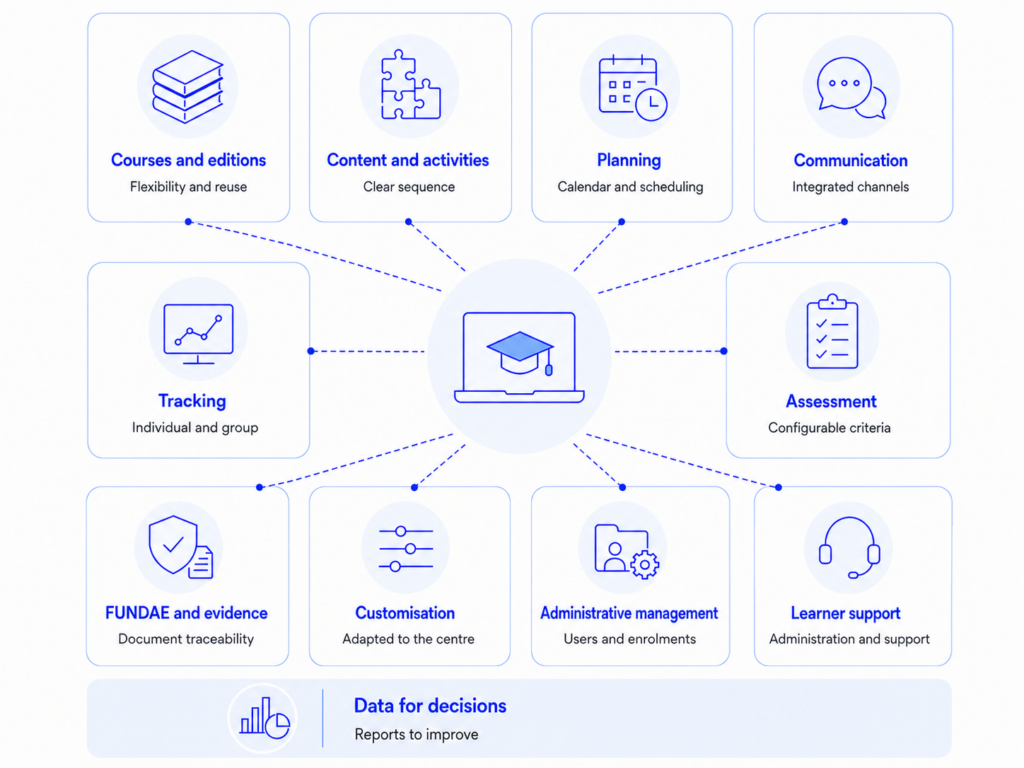
In summary, an e-learning platform for training centres should provide:
- flexibility to create courses and editions;
- clear organisation of content and activities;
- planning tools;
- integrated communication channels;
- individual and group tracking;
- configurable assessment and completion criteria;
- support for subsidised training and evidence management;
- customisation options;
- administrative management tools;
- learner support services;
- data for decision-making.
The point is not to have many features, but to ensure that all of them help the centre work better.
From content platform to training management environment
A training centre needs more than a repository of materials. It needs an environment that allows it to design, deliver, support, assess, justify and improve its training activity. When the platform responds to this reality, it stops being an isolated tool and becomes a support for the centre’s academic, administrative and strategic management.
With Weeras Academy, training centres can manage courses, editions and learning paths, organise resources and activities, plan the training agenda, communicate with learners, carry out individual and group tracking, configure completion criteria, collect evidence, manage FUNDAE-related processes and offer learner support spaces from a single environment.
If your training centre is reviewing how it manages face-to-face, online or blended training, this may be a good time to analyse whether your current platform really supports the complexity and growth of your training offer.
One comment
Comments are closed.



[…] why, when choosing an e-learning platform for a training centre, it’s worth checking whether it can also manage rooms, physical resources, timetables and […]